


ChicagoAgent ONE
4.277.00 Reviews
App Specs
- Version
- 4.8.5.1.5
- Updated On
- License
- Free
- Downloads
- 10,000+
- Developer
- PalmAgent
- Categories
- Finance
- Platform
- Android
Screenshots
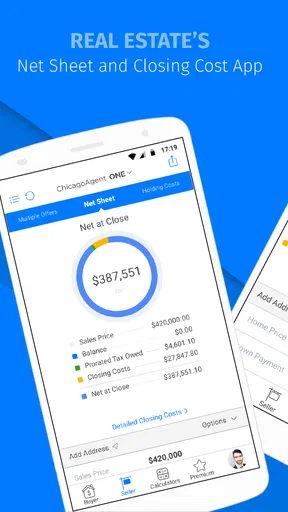
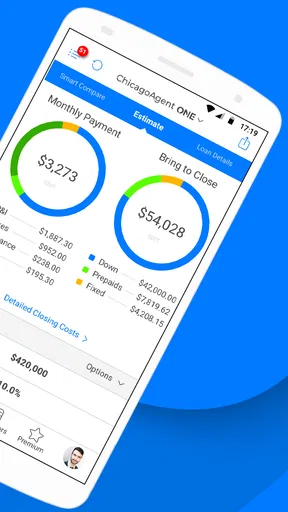
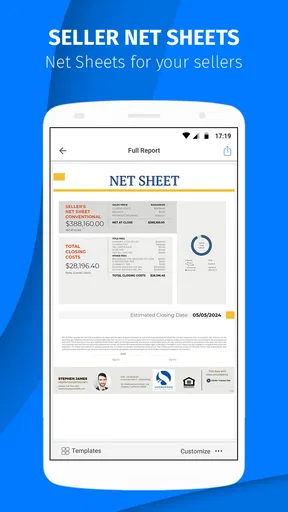


 Analysis by AppCompare
I approached ChicagoAgent ONE as a work tool rather than a general household finance app, and that distinction matters from the first screen. It is designed for real estate professionals, so its value depends less on casual browsing and more on whether it fits the way a property-focused team handles daily work. I can imagine it being installed on a shared office phone or a tablet used during property visits, but I would not mistake that shared-device possibility for built-in family management. The app is most useful when every person using it understands the professional context and keeps work activity separate from personal information.
Developed by PalmAgent, this free finance app has been available since October 10, 2014. Its current version is 4.8.5.1.5, and it runs on devices using Android 7.0 or later. The store listing places it in the Everyone age category, which makes it broadly accessible from an age-label perspective, although the actual content and responsibilities are clearly aimed at adults working in real estate. With more than ten thousand installs and an average rating of 4.2 from roughly 168 ratings, it has a modest but meaningful presence rather than the scale of a mainstream banking app.
How ChicagoAgent ONE Fits Into Shared Real Estate Work
I see shared real estate work as a question of clear handoffs, not simply putting the same app on a common device. In this section, I’d focus on how a small team can decide who checks information and when a task is ready for the next person, without assuming the app replaces their existing communication. That distinction helps set up the practical realities of sharing a screen.
A realistic shared-device scenario
Picture a small real estate office where an agent spends the morning moving between appointments and a coordinator remains at the desk. The agent may need to consult work information while away from the office, then pass an update to the coordinator when returning. A shared tablet could also sit in a meeting room for property discussions, provided the team treats it as a work device and not as a casual family tablet. In that setting, the app has a practical role: it keeps a professional workflow close at hand instead of forcing every task back onto a desktop computer.
The important point is that ChicagoAgent ONE is not aimed at managing a household budget, splitting groceries, or tracking personal spending. Its finance classification can make it sound broader than it is, but the real estate focus narrows the audience in a useful way. I would recommend it to someone whose work already involves property transactions and who wants a mobile companion for that activity. I would not install it simply because I wanted a general finance tool for a family.
On a shared device, I would establish one simple rule before anyone signs in: the tablet belongs to the business workflow, and only authorized colleagues should use the app. That rule is more important than the device itself. A family member borrowing the tablet to watch videos or browse unrelated material should not automatically gain access to professional information. The app’s Everyone label describes age suitability in the store, not a promise that every household member should use the same account.
The strongest shared-use approach is separation, not improvisation. Keep the app on a work-owned device when possible, avoid passing an already signed-in device around casually, and make sure the person responsible for the account knows who has used it. These are sensible habits for any professional app, but they matter especially when a household and a business share hardware.
Worth Reading Before You Choose

EA SPORTS FC Mobile 26 Is a Bigger Football Game, but It Takes Time

Flipboard Shows What News Apps Must Do Beyond the Feed

Switching to Android Auto Means Rethinking Your Driving Routine

Google Calendar Makes a Crowded Week Easier to Manage

Ludo King Makes the Most of the Minutes Between Plans

Baby Panda World Brings Quick Play to Modern Phones, but Its Game Library Feels Busy
Setting boundaries before the first real task
My first recommendation would be to decide who owns the account and who is merely using the device. Those are different roles. An agent may be the account holder, while an assistant uses the same office tablet for coordination. A spouse or older child might physically handle the device, but that does not make them part of the professional workflow. Defining that boundary early prevents the common mistake of treating a shared screen as a shared identity.
I would also choose a device with a clear purpose. On a personal phone, ChicagoAgent ONE competes with messages, calls, photos, and other apps. On a dedicated work tablet, the context is cleaner, but the device must be protected when it is left in a meeting room, car, or open office. The app itself should not be expected to solve every account or device-management problem. A screen lock, careful handoff, and a clear sign-out routine are part of using it responsibly.
There is another practical boundary: do not assume that installing the app creates a complete office system. A mobile application can support a professional process, but it does not automatically replace the judgment, communication, or record-keeping habits of a real estate team. I would test it with a low-risk internal task first, observe how the team moves information between people, and only then make it part of a more important routine.
That trial is particularly useful for households that share one device. If a partner or family member frequently needs the tablet for unrelated purposes, the team should ask whether the convenience is worth the confusion. In many cases, a separate work phone will be a better answer than trying to make one device serve everyone. ChicagoAgent ONE can be part of a shared setup, but shared hardware should not be confused with shared access.
Coordination between agents and assistants
Where I see the most potential is in small teams that need mobility without building an elaborate technology stack. An agent could use the app while working away from the desk, while a coordinator handles the surrounding conversation through the team’s normal channels. The app may become one piece of the process rather than the entire process, and that is a healthier expectation. It is easier to judge its usefulness when you ask, “Which step does this make easier?” instead of expecting it to organize every part of a business.
A good coordination routine should identify the source of truth. If one person updates information in the app while another keeps a separate spreadsheet and a third relies on memory, the team can create more uncertainty than the app removes. I would agree on who enters information, who checks it, and when the team considers an item current. This is a workflow recommendation rather than a claimed feature, but it is exactly the kind of discipline that determines whether a professional mobile tool helps or frustrates.
For a shared office device, I would keep handoffs verbal and explicit. “The tablet is ready for the next appointment” is not enough if the next person does not know whether the previous session is complete. A short handoff note outside the app, a team message, or a simple office routine can prevent duplicated work. The app can support access to the work process, but people still need to communicate about responsibility.
One useful trade-off is speed versus control. A single device can make it easy for a coordinator to help an agent quickly, but every extra user increases the chance of accidental changes or confusion about ownership. Individual devices usually provide cleaner accountability. A shared device makes more sense when cost, office layout, or occasional use is the priority. I would choose it for a small team with clear habits, not for a busy group that constantly passes one unlocked tablet from person to person.
What the age label means in a household
The Everyone content rating may reassure a household that the app is not labeled for mature entertainment or restricted content. Still, the professional purpose changes how I would discuss it with younger users. A child might be allowed to hold the tablet, but that does not mean the child should open a work account or handle property-related information. Age suitability and permission to use a professional account are separate questions.
For teenagers in a family business, I would define a narrow role before allowing access. They might help carry a device, read a non-sensitive instruction, or assist with a routine that an adult supervises. I would not give them unrestricted access merely because the store rating is Everyone. The right decision depends on trust, maturity, the information visible on the device, and the adult’s ability to supervise the activity.
This is also why I would avoid leaving the app open on a household tablet overnight. Even when everyone in the home is trusted, accidental taps and casual curiosity can create awkward situations. A work app deserves the same care as a paper folder left on a desk. The safest arrangement is an adult-controlled device with a predictable handoff, not an open family screen where anyone can continue the last session.
Families should also agree on what happens when the device leaves the home. A real estate professional may take it to an appointment, while another household member expects to use it later. That is a coordination issue, not a missing convenience feature. A shared calendar or simple household rule can be enough: work use takes priority during appointments, personal use waits until the professional session is finished, and the device is returned in a known state.
Where it is stronger than ordinary alternatives
Compared with a general finance app, ChicagoAgent ONE has a more focused identity. A budgeting app is built around personal income, expenses, and household decisions; this app is meant for real estate professionals. That focus is its main reason to choose it. If your work revolves around properties and you want a mobile tool aligned with that field, a general-purpose money manager is unlikely to feel like a direct replacement.
Compared with a web-only office system, a mobile app can be more convenient when work happens away from a desk. That matters during a day filled with appointments, travel, and quick checks between conversations. The trade-off is that a smaller mobile screen may be less comfortable for extended administrative work. I would use a phone or tablet for the mobile part of the workflow and keep a larger-screen system available when a task requires careful review or prolonged entry.
Compared with a simple notes app, the specialized identity is another advantage. Notes are flexible, but they leave the user responsible for inventing a structure and remembering how each item relates to the broader real estate process. ChicagoAgent ONE is more appealing when the user wants a tool made for this professional setting rather than a blank page. On the other hand, someone who only needs a private checklist may find a notes app faster and less demanding.
The in-app purchase range, from ninety-nine cents to $9.99 per item, is worth considering before a team standardizes on the app. The download is free, but free installation does not necessarily mean every useful part of the experience costs nothing. I would review any purchase prompt carefully and decide whether the benefit applies to one agent, a coordinator, or the whole office. For a shared device, that decision should be made by the account owner rather than by whichever person happens to tap first.
Practical questions I would settle before adoption
Would I use it for a family budget? No. The professional real estate focus makes it a poor match for household expense tracking or shared personal finances. A dedicated budgeting app would be better for that job because it would be designed around categories, spending, and household participation rather than property work.
Would I put it on a child’s personal phone? Generally, no. The Everyone label does not turn a professional account into a children’s app. I would keep access with the adult professional or a clearly authorized assistant, especially when a device contains other work material.
Can a small office share one installation? It can be reasonable when the device has a clear owner, the team agrees on handoff rules, and the account is not treated as a casual communal login. If several people need simultaneous, independent access, separate devices or a broader office system may be more suitable than relying on one shared screen.
Is it a replacement for every other real estate tool? I would not assume that. I see it as a focused mobile component. Teams should test the exact workflow they care about, including how information is checked, communicated, and preserved. If the app fits one important step well, that may be enough; if the team expects a complete business platform, disappointment is more likely.
Does the age rating settle the trust question? No. Trust comes from the person, the device, the account arrangement, and the sensitivity of the work. The rating is helpful context for installation, but it should not replace adult judgment about access.
My household and office verdict
After looking at ChicagoAgent ONE through the lens of shared use, I would recommend it to a real estate professional who wants a mobile-focused companion and is willing to create clear boundaries around devices and accounts. Its free entry point makes testing straightforward, while the established version history and current release suggest that it is not a brand-new experiment. The average rating of 4.2 indicates generally positive reception, though the relatively small review base means I would still judge it against my own workflow rather than treating that score as a guarantee.
I would skip it for a household searching for a general finance app, a family organizer, or a child-friendly money tool. I would also hesitate if the office expects one app to replace every conversation, record, and administrative system. The best fit is narrower: an adult real estate user, or a small team with a defined process, who benefits from having work-related functionality available beyond the desk.
My preferred setup would be one adult account owner, a work-designated device where possible, and a written handoff routine for any assistant who needs access. I would keep personal family use separate, review in-app purchases before approving them, and test the app on an ordinary workday before depending on it during a critical appointment. Those steps do more to protect a shared environment than simply installing the app and hoping everyone understands the boundaries.
In short, ChicagoAgent ONE makes sense when “shared” means coordinated professional use, not unrestricted household access. PalmAgent’s app has a specific audience, and that specificity is both its appeal and its limitation. For the right real estate worker, it can be a useful mobile addition; for everyone else, choosing a tool built around the actual household or financial task will be the more honest decision.
Pros
- Fast access to Chicago police and public safety information.
- Clean interface makes key features easy to find.
- Useful for staying informed about local incidents and alerts.
- Supports quick reporting and communication with authorities.
- Available on mobile for convenient access while traveling.
Cons
- Primarily useful to Chicago residents and visitors.
- Some features may require location or notification permissions.
- Information availability can vary by incident and agency updates.
- May use extra battery when location services remain active.
- Not a replacement for calling emergency services directly.
FAQs for ChicagoAgent ONE
What is ChicagoAgent ONE, and who is it designed for?
ChicagoAgent ONE is a real estate-focused mobile platform created for professionals working with Chicago-area property listings and transactions. It can help agents access listing information, manage contacts, review market data, and stay connected while away from a desk. The exact tools available may depend on your brokerage, account permissions, MLS access, and whether you use the Android or iOS version.
Do I need an account or brokerage invitation to use ChicagoAgent ONE?
Yes, ChicagoAgent ONE is generally intended for authorized real estate professionals rather than casual users. You may need an active account, login credentials, MLS membership, or an invitation from a participating brokerage or organization before the app will work fully. If you download it but cannot sign in, contact your brokerage administrator or the platform’s support team instead of creating multiple accounts.
What features can I expect from ChicagoAgent ONE?
After signing in, users may be able to search and view property listings, access listing details, save or organize properties, manage client-related information, and receive updates connected with their real estate workflow. Available features can vary according to permissions and regional data agreements. Before relying on the app for a transaction, verify important listing details through the official MLS or your brokerage system.
Is ChicagoAgent ONE free to download and use?
The application may be available to download without an upfront charge, but that does not necessarily mean every feature is free for everyone. Access can be tied to a brokerage subscription, MLS membership, professional license, or organization-provided account. Mobile data charges may also apply when browsing listings or uploading information. Check with your brokerage or the app’s official listing for current pricing and eligibility.
What should I check before downloading ChicagoAgent ONE?
Before installing ChicagoAgent ONE, confirm that your brokerage or MLS organization supports the app and that your device meets its current Android or iOS requirements. Review the permissions requested, privacy policy, and account terms, particularly if you will store client information. Also make sure you have reliable internet access, because some listing and account features may not function correctly offline or with weak connectivity.


